

Can Canonical Errors Hurt Local SEO Rankings?
Yes. Broken canonical tags and near-duplicate service or location pages can prevent the page we actually want Google to rank from becoming the primary indexed URL. Google groups duplicate or highly similar pages and chooses a canonical version based on signals such as redirects, rel="canonical" tags, sitemap entries, internal links, and page quality. A canonical tag is a strong signal, but Google can select a different URL when site signals conflict.
At Pinpoint Digital, LLC, we treat a canonical tag audit for local SEO as part of the technical foundation behind service-area and multi-location websites. Fixing the tag alone is rarely enough. We also review duplicate content, internal links, redirects, sitemaps, and page purpose.
What Is a Canonical Tag?
A canonical tag tells search engines which URL represents the preferred version of similar or duplicate content.
For example, a WordPress website may accidentally create several versions of the same service page through:
- Tracking parameters
- HTTP and HTTPS versions
- WWW and non-WWW URLs
- Category or archive templates
- Old landing pages
- Staging copies
- Pagination
- Duplicate town pages
Google may consolidate those URLs and rank only the version it considers canonical. Google also recommends using self-referencing canonicals on the preferred page and consistently linking internally to that preferred URL.
That sounds simple until a WordPress plugin, migration, page template, or developer accidentally points an important page somewhere else.
How Canonical Errors Quietly Damage Local Rankings
A local contractor may have separate pages for Hartford, Bristol, Plainville, and Southington.
Each page looks correct in the browser.
Behind the scenes, however, every location page could contain:
rel="canonical" href="https://example.com/service/"
Now Google receives a strong signal that the main service page should represent those local URLs.
The town pages might remain crawlable, but Google may choose not to treat them as independent pages.
Other common problems we find include:
- A service page canonicalized to the homepage
- Canonicals pointing to redirected URLs
- HTTP canonicals on an HTTPS website
- Canonicals copied from a staging environment
- Multiple SEO plugins creating conflicting tags
- Sitemap URLs disagreeing with canonical URLs
- Internal links pointing toward noncanonical versions
Our related guide on hidden technical SEO problems covers additional crawl, indexation, redirect, and site architecture issues that can create the same type of ranking loss. Technical SEO Silent Killers Guide
Duplicate “Near Me” Pages Create Another Problem
A poor multi location SEO strategy often creates dozens of pages by replacing only the town name.
For example:
Plumber in Hartford
Plumber in Bristol
Plumber in Plainville
If every page contains nearly identical headings, service descriptions, FAQs, testimonials, and calls to action, search engines have little reason to treat each page as uniquely valuable.
Google states that creating substantially similar pages for specific cities or regions that funnel visitors toward the same destination can qualify as doorway abuse.
That means duplicate content near me pages should never be built solely by swapping city names.
What Makes a Strong Location Page?
A useful local page should answer questions specific to that service area.
We may strengthen a location page with:
- Services commonly requested in that market
- Local project examples
- Neighborhoods or surrounding towns served
- Relevant climate or property conditions
- Customer reviews from the area
- Original photographs
- Unique FAQs
- Local case studies
- Clear service-area context
The goal is not creating more URLs. The goal is creating pages that deserve to exist independently.
How to Fix a Canonical Issue in WordPress
When someone asks us how to fix a canonical issue in WordPress, we start with diagnosis rather than immediately changing an SEO plugin setting.
1. Check the Google-Selected Canonical
Use Google Search Console URL Inspection.
Compare:
User-declared canonical
with
Google-selected canonical
When those URLs differ, we investigate why Google prefers another page. Google specifically recommends starting with URL Inspection when troubleshooting canonicalization.
2. Review the Source Code
Check the <head> section for the canonical element.
The preferred page should normally point to itself unless there is a legitimate duplicate that should consolidate elsewhere.
3. Check WordPress SEO Plugins
Yoast, Rank Math, custom themes, page builders, or development code may modify canonicals.
Two systems controlling the same tag can create conflicting output.
4. Compare the XML Sitemap
The sitemap should contain the preferred indexable URL.
Avoid listing a URL in the sitemap while canonicalizing it somewhere else.
5. Review Internal Links
Menus, service pages, blog posts, breadcrumbs, and location pages should consistently link to the preferred URL.
6. Consolidate True Duplicates
If two pages serve the same purpose, keeping both may create unnecessary competition.
We may merge the content and redirect the weaker URL rather than forcing both pages to compete.
Canonical Tags Do Not Fix Thin Location Content
One of the biggest mistakes we see is treating canonical tags as a duplicate-content repair tool.
Canonicalization helps Google consolidate duplicate URLs. It does not transform thin pages into strong local landing pages.
If six town pages contain nearly identical content, each page needs a clear reason to exist.
Google notes that pages clustered as duplicates generally separate faster when the difference between them becomes clear and significant.
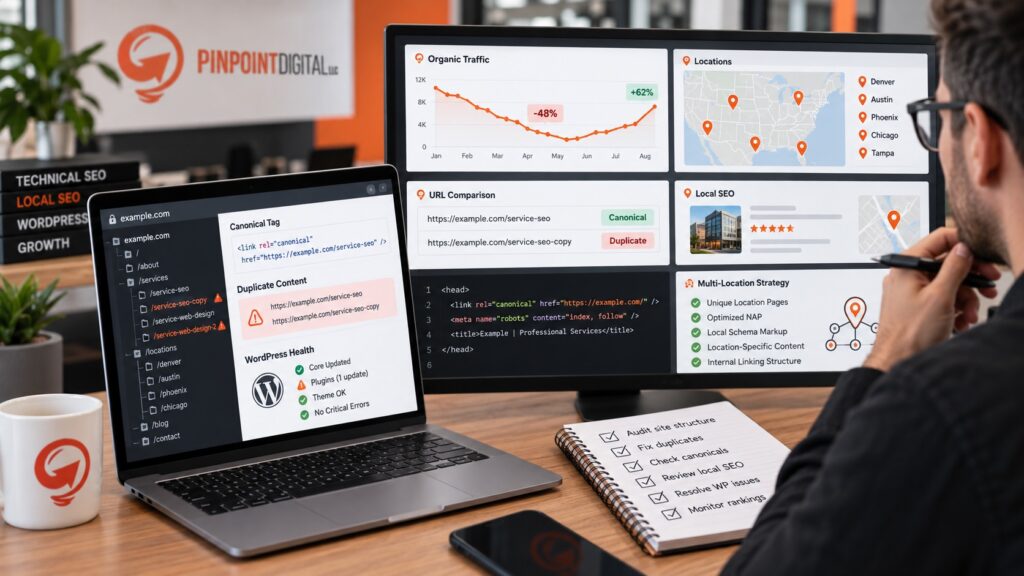
Our Multi-Location SEO Strategy
At Pinpoint Digital, LLC, we connect technical SEO with content strategy.
Our approach reviews:
- Canonical tags
- Indexation
- Redirects
- XML sitemaps
- Internal linking
- Location-page uniqueness
- Local schema
- Service-area architecture
- Search intent
- Conversion paths
Our broader Connecticut digital marketing approach combines SEO, web development, content, and local search rather than treating each element as an isolated task.
Stop Letting Duplicate Pages Compete Against Each Other
Ranking drops are not always caused by competitors or algorithm updates.
Sometimes the website quietly tells Google that the wrong page matters.
A detailed canonical tag audit for local SEO can uncover conflicting URLs, copied location templates, WordPress configuration problems, and weak service-area architecture before those problems affect more leads.
At Pinpoint Digital, LLC, we help Connecticut businesses build cleaner websites, stronger location pages, and multi-location SEO systems designed around both search visibility and conversions.